Design Smarter: The Notebook Label Bundle for KDP Creators
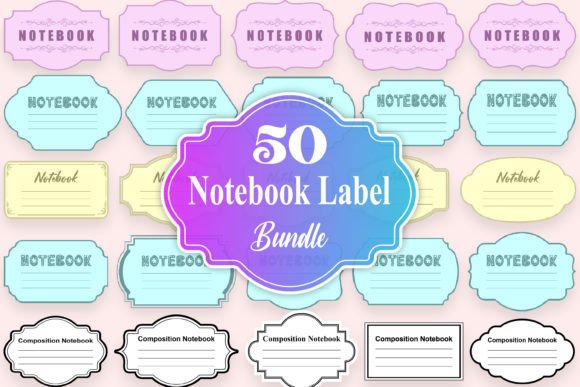
For self-publishers and graphic designers working within the Amazon Kindle Direct Publishing ecosystem, the pressure to produce professional-grade cover art is relentless. You need assets that are not only visually appealing but technically flawless for print and digital formats. The Notebook Label and Composition Notebook Label Bundle represents a specific solution to a common design bottleneck: creating authentic, textured typography without spending hours manipulating vector points. This collection of high-resolution PNG files offers a distinct vintage and educational aesthetic, bridging the gap between nostalgic charm and modern publishing standards.
The Anatomy of the Notebook Label Aesthetic
Understanding the visual personality of the Notebook Label is the first step in utilizing it effectively. This isn't a standard serif font or a clean sans serif font; it is a graphical asset that mimics the tactile quality of embossed or printed paper labels found on classic school supplies. The design language speaks to "analog" authenticity. It avoids the sterile perfection of digital vectors, instead embracing the subtle imperfections that suggest a physical object.
The style leans heavily into vintage typography and editorial design trends. It carries a personality that is simultaneously academic and artistic. Because the files are provided as PNGs with transparent backgrounds, the edges of the letters are softened to blend seamlessly into various textures. This allows the Notebook Label to function almost like a handwritten font in terms of flexibility, but with the structural integrity of a bold, typeset display font. The aesthetic is particularly effective for genres like journaling, education, self-help, and retro-themed brand identity projects.
Technical Specifications for Professional Use
When dealing with design assets for print design, resolution is non-negotiable. A common pitfall for independent publishers is using low-resolution web graphics for book covers, resulting in pixelation during the printing process. The Notebook Label bundle addresses this directly. Each of the 50 files is rendered at 3000x2000 pixels with a 300 DPI resolution. This high-fidelity output ensures that the text remains crisp even when scaled for larger paperback formats or detailed packaging design.
Furthermore, the RGB color mode is optimized for the initial design phase and digital viewing, which is standard for KDP cover designs before conversion. The transparent background is critical for layering; it allows you to place these labels over complex cover art, textures, or color blocks without dealing with messy masking or "halo" effects. This technical preparation saves significant production time, allowing you to focus on visual hierarchy and composition rather than file cleanup.
Strategic Applications for KDP and Branding
The versatility of the Notebook Label extends far beyond simple cover decoration. In the realm of creative font usage, these assets serve as powerful focal points for logo design and social media graphics. For KDP publishers, the immediate application is the book cover title. However, the true value lies in creating a cohesive ecosystem. You can use these labels on the spine, the back cover, and even as design elements on the interior chapter title pages to create a unified reading experience.
For small business owners and marketers, this bundle is a resource for packaging design. Imagine a stationery brand using these labels on physical product stickers, or a coffee shop using the aesthetic for their "daily special" chalkboard graphics. The composition notebook style triggers immediate recognition. It subconsciously communicates ideas of note-taking, brainstorming, and organization. Using the Notebook Label in your marketing materials can make a brand feel more accessible and grounded.
Enhancing Visual Hierarchy and Readability
In modern typography, contrast is king. A major challenge designers face is pairing fonts that have enough distinction to guide the reader's eye. The Notebook Label works best as a primary headline or accent element. Because it is a display font style with high visual weight, it commands attention immediately. This creates a clear entry point for the viewer.
For example, if you are designing a cover for a productivity planner, the Notebook Label establishes the theme instantly. You would then pair it with a highly legible sans serif font for the subtitles and descriptions. This pairing strategy ensures that while the title grabs attention, the supporting text remains readable. The label style handles the emotional heavy lifting—evoking a specific mood—while the secondary font handles the functional information transfer. This balance is essential for professional editorial design.
Practical Guide to Pairing and Implementation
Choosing the right companion elements for the Notebook Label requires a thoughtful approach. You want to avoid visual competition. Since the notebook aesthetic is often busy and textured, pairing it with a clean, geometric sans serif font usually yields the best results. Fonts like Montserrat, Roboto, or Open Sans provide a modern counterpoint to the vintage label look. This combination creates a "high-low" dynamic that feels contemporary yet nostalgic.
Avoid pairing the Notebook Label with other decorative or script fonts. The visual noise would be too high, leading to a cluttered composition that hurts readability. Instead, treat the label as the "hero" element. Use it for the main title or a key phrase, and let the rest of the layout breathe with simpler typography. This restraint demonstrates professionalism and strengthens the overall brand identity.
Evaluating Fit and Commercial Licensing
Before integrating these assets, assess the tone of your project. The Notebook Label implies a specific narrative: education, creativity, DIY, or organization. If you are designing a cover for a serious legal thriller or a high-fashion magazine, this style might feel out of place. However, for content creators, bloggers, and crafters, it is often the perfect fit.
From a workflow perspective, because these are PNG files rather than installable font files, you will be working with them in raster-based software like Adobe Photoshop or Affinity Photo, or drag-and-drop editors like Canva. This is advantageous for users who may not be comfortable with complex vector typography manipulation. Simply drag the label onto your canvas, resize it, and position it. This accessibility makes the Notebook Label bundle a practical tool for hobbyists and professional designers alike, ensuring that high-quality modern typography is accessible regardless of technical skill level.